Welcome to Day 02 of #The12DaysOfSwiftmas
Today’s prompt:

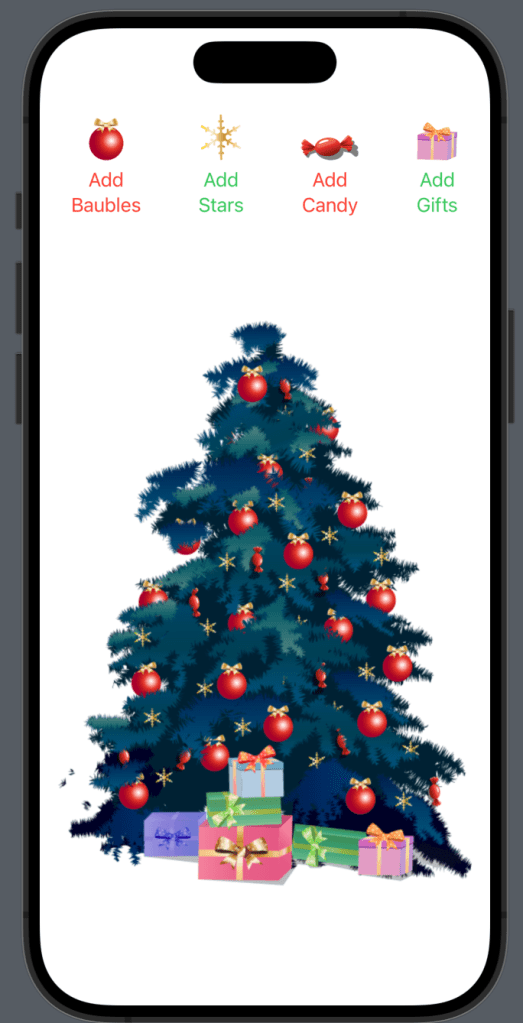
Not going to lie, this one gave me a headache. Boy did I go around the trees to make my final version!
So I started off all fancy like, looking for ideas on google. I then got to work on a super animated hyped up rotating tree…this took me two whole days, the code looked awful & I knew it needed so much more work & essentially…not what Swiftmas is about. I want everyone to be able to produce small easy apps during the busy time for fun. Not pass on my headache. So I walked away for a few hours…
With a huge thank you to my non programming friends for their input of ideas, the winner was “Decorate a Christmas tree”. Now this could play to my strengths with a background in design & animation. But again I didn’t have hours to do this. So I went to pixabay (huge fan of every single artist & photographer who helps out devs like us!). The tree is a gorgeous vector image made in illustrator. I knew with a bit of jiggery pokery I could make this work.
After opening up the illustrator file I realised this was a little harder to put into programming… but not impossible as long as I essentially layer the code as I would layer a design in software such as illustrator. I have included all the assets in the Image asset folder of the GitHub project for you. These have all been layered (named as such groups) so that some baubles are under certain branches, some candy doing the same etc. This may sound confusing but if you have downloaded the project file & have the image assets then just go with it. It will click. If you have ever used photoshop or like alternative then just think of the images as layers like in these kind of softwares.
You can find the swiftmas GitHub here: https://github.com/thecodingsprite/Swiftmas-2023
Now after adding all the assets to our newly created ChristmasTree project it was time to plan ahead.
We want buttons to enable the decoration. This means we are going to need some @State properties to toggle on and off based on the users choice.
So go ahead and add these @State properties to your contentView (above the body).
struct ContentView: View {

    @State var isBaublesOn = false
    @State var isStarsOn = false
    @State var isCandyOn = false
    @State var isGiftsOn = false

    var body: some View {...}}
Next I worked on the layering before adding the buttons whilst it was in my head but you can do the buttons first if you wish.
This is the correct layer order below. This may seem confusing but we are placing them in a ZStack & then working our way to the top layer. 6 = base layer, 1 = top layer. As I did this layering I started with the tree (hence the copy & paste of the modifiers), then added the decorations which I wrapped in an if statement knowing that they should only show when that state changes to true. (we will tidy the modifiers up at the end)
// We will need a VStack for the buttons & the tree to build nice.
VStack {
          // Imagery
            ZStack {
                // Base Layer
                Image("tree-06")
                    .resizable()
                    .aspectRatio(contentMode: .fit)

                // Add baubles
                if isBaublesOn {
                    Image("baubles-06")
                        .resizable()
                        .aspectRatio(contentMode: .fit)
                }

                // Add candy
                if isCandyOn {
                    Image("candy-06")
                        .resizable()
                        .aspectRatio(contentMode: .fit)
                }

                Image("tree-05")
                    .resizable()
                    .aspectRatio(contentMode: .fit)
                // Add baubles
                if isBaublesOn {
                    Image("baubles-05")
                        .resizable()
                        .aspectRatio(contentMode: .fit)
                }

                // Add candy
                if isCandyOn {
                    Image("candy-05")
                        .resizable()
                        .aspectRatio(contentMode: .fit)
                }

                // Add stars
                if isStarsOn {
                    Image("stars-05")
                        .resizable()
                        .aspectRatio(contentMode: .fit)
                }

                Image("tree-04")
                    .resizable()
                    .aspectRatio(contentMode: .fit)

                // Add candy
                if isCandyOn {
                    Image("candy-04")
                        .resizable()
                        .aspectRatio(contentMode: .fit)
                }
                Image("tree-03")
                    .resizable()
                    .aspectRatio(contentMode: .fit)
                // Add baubles
                if isBaublesOn {
                    Image("baubles-03")
                        .resizable()
                        .aspectRatio(contentMode: .fit)
                }

                Image("tree-02")
                    .resizable()
                    .aspectRatio(contentMode: .fit)

                // Add stars
                if isStarsOn {
                    Image("stars-02")
                        .resizable()
                        .aspectRatio(contentMode: .fit)
                }

                Image("tree-01")
                    .resizable()
                    .aspectRatio(contentMode: .fit)
                // Add baubles
                if isBaublesOn {
                    Image("baubles-01")
                        .resizable()
                        .aspectRatio(contentMode: .fit)
                    }

                // Add candy
                if isCandyOn {
                    Image("candy-01")
                        .resizable()
                        .aspectRatio(contentMode: .fit)
                }

                // Add gifts
                if isGiftsOn {
                    Image("gifts")
                        .resizable()
                        .aspectRatio(contentMode: .fit)
                }
            }
            .padding()
}
Next the buttons. A simple use of .toggle() is an easy way to toggle between true & false for the @State values, turning them on & off. These are at the top of the VStack wrapped in HStacks like so:
VStack {
            // Buttons
            HStack (alignment: .bottom, spacing: 50) {
                Button {
                    isBaublesOn.toggle()
                } label: {
                    VStack {
                        Image("bauble")
                            .resizable()
                            .aspectRatio(contentMode: .fit)
                            .frame(width: 30)
                        Text("Add Baubles")
                            .tint(.red)
                    }
                }
                Button {
                    isStarsOn.toggle()
                } label: {
                    VStack {
                        Image("star")
                            .resizable()
                            .aspectRatio(contentMode: .fit)
                            .frame(width: 35)
                        Text("Add Stars")
                            .tint(.green)
                    }
                }
                Button {
                    isCandyOn.toggle()
                } label: {
                    VStack {
                        Image("candy")
                            .resizable()
                            .aspectRatio(contentMode: .fit)
                            .frame(width: 50)
                        Text("Add Candy")
                            .tint(.red)
                    }
                }
                Button {
                    isGiftsOn.toggle()
                } label: {
                    VStack {
                        Image("gift")
                            .resizable()
                            .aspectRatio(contentMode: .fit)
                            .frame(width: 35)
                        Text("Add Gifts")
                            .tint(.green)
                    }
                }

            }
            .padding()
...}
Now for the spacing & tidy up of those modifiers. We want as little re-used code as we can for efficiency. First off let’s tidy up those re-used image modifiers. We can do so by extending the Image struct from Apple like so…place the extension outside the ContentView.
extension Image {
    func imageModify() -> some View {
        self
            .resizable()
            .aspectRatio(contentMode: .fit)
    }
}

//Then we replace the existing modifiers with:
Image("gifts")
    .imageModify()
I added a Spacer() before & after the ZStack containing all the images.
The complete functional code is at the bottom of this post.
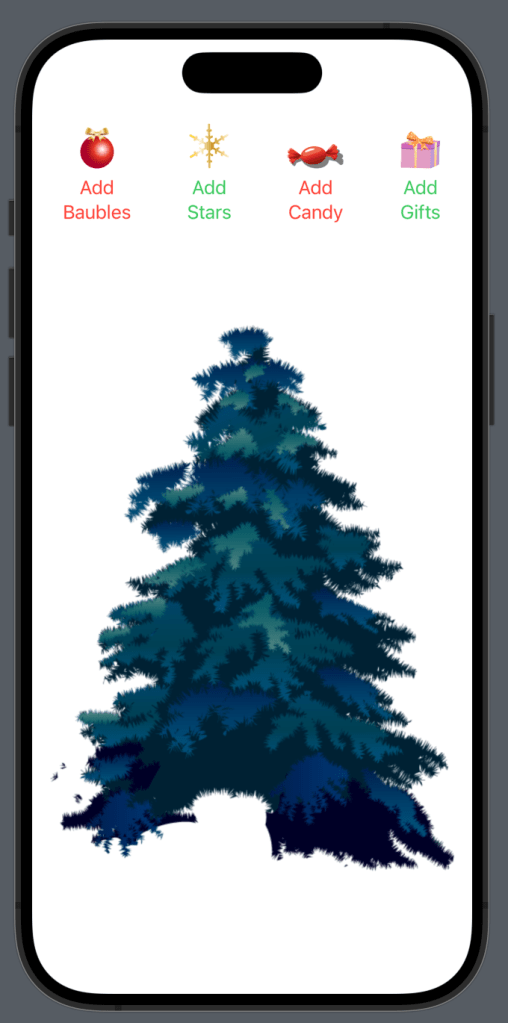
Now we have a completed Christmas Tree Decorating App
See you tomorrow for day 3!
Complete Code
import SwiftUI

struct ContentView: View {

    @State var isBaublesOn = false
    @State var isStarsOn = false
    @State var isCandyOn = false
    @State var isGiftsOn = false

    var body: some View {
        VStack {
            // Buttons
            HStack (alignment: .bottom, spacing: 50) {
                Button {
                    isBaublesOn.toggle()
                } label: {
                    VStack {
                        Image("bauble")
                            .imageModify()
                            .frame(width: 30)
                        Text("Add Baubles")
                            .tint(.red)
                    }
                }
                Button {
                    isStarsOn.toggle()
                } label: {
                    VStack {
                        Image("star")
                            .imageModify()
                            .frame(width: 35)
                        Text("Add Stars")
                            .tint(.green)
                    }
                }
                Button {
                    isCandyOn.toggle()
                } label: {
                    VStack {
                        Image("candy")
                            .imageModify()
                            .frame(width: 50)
                        Text("Add Candy")
                            .tint(.red)
                    }
                }
                Button {
                    isGiftsOn.toggle()
                } label: {
                    VStack {
                        Image("gift")
                            .imageModify()
                            .frame(width: 35)
                        Text("Add Gifts")
                            .tint(.green)
                    }
                }

            }
            .padding()

            Spacer()

            // Imagery
            ZStack {
                // Base Layer
                Image("tree-06")
                    .imageModify()

                // Add baubles
                if isBaublesOn {
                    Image("baubles-06")
                        .imageModify()
                }

                // Add candy
                if isCandyOn {
                    Image("candy-06")
                        .imageModify()
                }

                Image("tree-05")
                    .imageModify()

                // Add baubles
                if isBaublesOn {
                    Image("baubles-05")
                        .imageModify()
                }

                // Add candy
                if isCandyOn {
                    Image("candy-05")
                        .imageModify()
                }

                // Add stars
                if isStarsOn {
                    Image("stars-05")
                        .imageModify()
                }

                Image("tree-04")
                    .imageModify()

                // Add candy
                if isCandyOn {
                    Image("candy-04")
                        .imageModify()
                }
                Image("tree-03")
                    .imageModify()
                // Add baubles
                if isBaublesOn {
                    Image("baubles-03")
                        .imageModify()
                }

                Image("tree-02")
                    .imageModify()

                // Add stars
                if isStarsOn {
                    Image("stars-02")
                        .imageModify()
                }

                Image("tree-01")
                    .imageModify()

                // Add baubles
                if isBaublesOn {
                    Image("baubles-01")
                        .imageModify()
                    }

                // Add candy
                if isCandyOn {
                    Image("candy-01")
                        .imageModify()
                }

                // Add gifts
                if isGiftsOn {
                    Image("gifts")
                        .imageModify()
                }
            }
            .padding()

            Spacer()
        }
    }
}

extension Image {
    func imageModify() -> some View {
        self
            .resizable()
            .aspectRatio(contentMode: .fit)
    }
}
