

Welcome to Day 04 of #The12DaysOfChristmas
Today’s prompt is:
I was excited for this one. I think the prompt gives way to so much interpretation. My first thought was a calculator…but again more advanced than I was going for this challenge. I really do want to be able to include programmers of all levels. So I can up with Festive Funds instead. A budget helper app.
Don’t forget to head over to my Swiftmas Repo to clone any projects: https://github.com/thecodingsprite/Swiftmas-2023

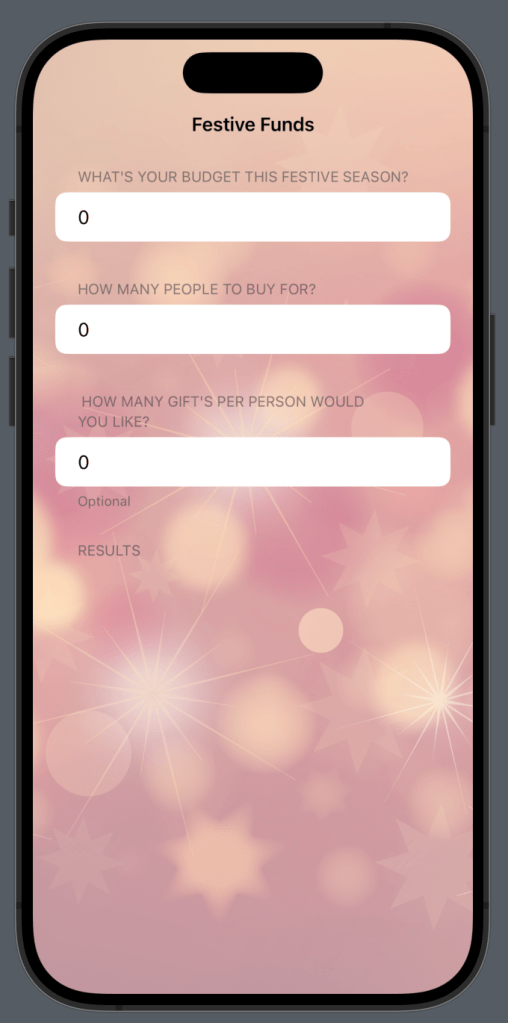
My idea was pretty simple. User inputs what their budget is & how many people to buy for/gifts to purchase per person & the app calculates it all & makes everything look festive whilst doing so. Not the most wham packed app, but still this app has a good few SwiftUI elements to it that I thought it would be perfect for this challenge.
So I started off by setting up the UI for roughly how I wanted it to look. I aimed a tad more girly for the design as generally more women tend to be the festive budgeters. I knew some @State properties I was thinking of storing & I knew that I wanted to use a Form for the layout. So this is how I setup the app.
import SwiftUI

struct ContentView: View {

    @State var giftsToBuy = ""
    @State var budget = ""
    @State var amountOfPeople = ""

    var body: some View {

        NavigationStack {

            Form {
                // Funds available
                Section {
                    TextField("Enter you entire budget", text: $budget)

                } header: {
                    Text("What's your budget this festive season?")
                }

                // Amount of people to divide funds by
                Section {
                    TextField("0", text: $amountOfPeople)
                } header: {
                    Text("How many people to buy for?")
                }

                // Optional: How many gifts per person
                Section {
                    TextField("Optional", text: $giftsToBuy)
                } header: {
                    Text(" How many gift's per person would you like?")

                }

                // Results
                Section {
                    // Display Budget per person
                    Text("")
                    // Display gifts per person
                    Text("")
                }
            }
            .background(Image("bg")
                .resizable()
                .aspectRatio(contentMode: .fill)
                .ignoresSafeArea()
                .opacity(0.5))
            .scrollContentBackground(.hidden)
            .navigationTitle("Festive Funds")
            .navigationBarTitleDisplayMode(.inline)
        }
    }
This lays out the sections of the form. I set the background to be an image using the .background() modifier for easier control of the aspect ratio again. For those wondering how to change the background of a form (this seems to work for list too) then let me point out this modifier here:
.scrollContentBackground(.hidden)This is attached to the form itself & allows us to change the background nicely.
Next was working out the logic & updating the UI in tandem. I realised a mistake I made in setting the textfields to accept a String when in fact we wanted an Int datatype. So first off I changed those.
// change the @State variables first

   @State var giftsToBuy = 0
   @State var budget = 0
   @State var amountOfPeople = 0

// now update the textfields to accept the int datatype

TextField("budget", value: $budget, formatter: NumberFormatter())
                        .keyboardType(.decimalPad)

TextField("people", value: $amountOfPeople, formatter: NumberFormatter())
                        .keyboardType(.decimalPad)

TextField("gifts", value: $giftsToBuy, formatter: NumberFormatter())
                        .keyboardType(.decimalPad)
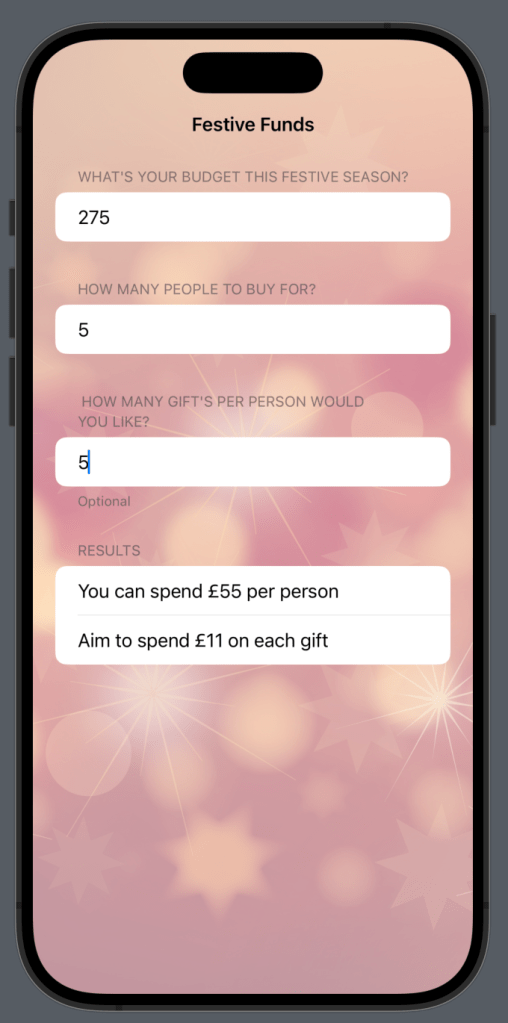
Now for the math logic. Pretty simple math for this kind of app. We only really need two sums. One to divide the budget by the amount of people to buy for & one to then use the previous sum to work out the amount we can spend on each gift. So replace the Text() placeholders int he Results section with this:
// Results
                Section {
                    // Display Budget per person
                    if budget > 0 && amountOfPeople > 0 {

                        var totalPerPerson = budget / amountOfPeople

                        Text("You can spend £\(totalPerPerson) per person")

                        // Display gifts per person
                        if giftsToBuy > 0 {

                            var giftAmount = totalPerPerson / giftsToBuy

                            Text("Aim to spend £\(giftAmount) on each gift")
                        }
                    }
Here you can see I also added those if statements to check that we numbers to do sums with in the first place. Otherwise our app would crash as we would have nothing to work with. That’s it.
The complete functional code is at the bottom of this post.
Our completed FestiveFunds App in use

See you tomorrow for Day 05
Complete Code
import SwiftUi

struct ContentView: View {

    @State var giftsToBuy = 0
    @State var budget = 0
    @State var amountOfPeople = 0

    var body: some View {

        NavigationStack {

            Form {
                // Funds available
                Section {
                    TextField("budget", value: $budget, formatter: NumberFormatter())
                        .keyboardType(.decimalPad)
                } header: {
                    Text("What's your budget this festive season?")
                }

                // Amount of people to divide funds by
                Section {
                    TextField("people", value: $amountOfPeople, formatter: NumberFormatter())
                        .keyboardType(.decimalPad)
                } header: {
                    Text("How many people to buy for?")
                }

                // Optional: How many gifts per person
                Section {
                    TextField("gifts", value: $giftsToBuy, formatter: NumberFormatter())
                        .keyboardType(.decimalPad)
                } header: {
                    Text(" How many gift's per person would you like?")
                } footer: {
                    Text("Optional")
                        .font(.caption)
                }

                // Results
                Section {
                    // Display Budget per person
                    if budget > 0 && amountOfPeople > 0 {

                        var totalPerPerson = budget / amountOfPeople

                        Text("You can spend £\(totalPerPerson) per person")

                        // Display gifts per person
                        if giftsToBuy > 0 {

                            var giftAmount = totalPerPerson / giftsToBuy

                            Text("Aim to spend £\(giftAmount) on each gift")
                        }
                    }
                } header: {
                    Text("Results")
                }
            }
            .background(Image("bg")
                .resizable()
                .aspectRatio(contentMode: .fill)
                .ignoresSafeArea()
                .opacity(0.5))
            .scrollContentBackground(.hidden)
            .navigationTitle("Festive Funds")
            .navigationBarTitleDisplayMode(.inline)
        }
    }
}
