
Welcome to Day 06 of #The12DaysOfSwiftmas
Today’s prompt…
This prompt is by far one of my favourites. I am so excited to see how everybody interoperates it. I have loved writing & making stories since I was little. Being neurodivergent we see the world in images. So when I get a chance to write a story, I can immerse myself into my own little movie playing in my head.
To start this app I opened my notepad on my iPad & began randomly writing a story that popped into my head. I only wanted a short story. This is meant to be a non time sucking challenge.
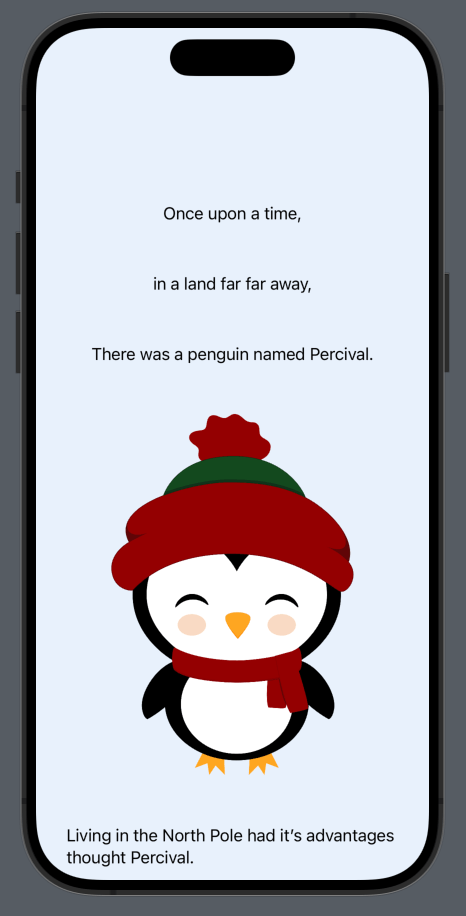
I decided to go with a web comic kind of style for reading. If you aren’t familiar with this style, it’s a story that you scroll with images & text mixed. (Like how this app pans out)
Then I went searching Canva for images to suit my story. These are all included in the image assets folder in the GitHub repo: https://github.com/thecodingsprite/Swiftmas-2023/tree/main
Then I started the code…trigger warning, very messy code ahead (it does get fixed by the end though). I used a ScrollView() so the story could easily be read by the user.
import SwiftUI

struct ContentView: View {

    var body: some View {

            ScrollView() {
                VStack(spacing: 50) {
                    Text("Once upon a time,")
                    Text("in a land far far away,")
                    Text("There was a penguin named Percival.")
                    Text("IMAGE PENGUIN HERE")
                    Text("Living in the North Pole had it’s advantages thought Percival.")
                    Text("A quiet life, lots of fish to eat & beautiful scenery.")
                    Text("Until one fateful evening on a cold December night…")
                    Text("Bang Crash COMIC IMAGES")
                    Text("What was that shouted Percival in a sleepy haze…")
                    Text("Ho Ho Ho")
                    Text("Sorry to bother you little Penguin but I seem to have crashed!")
                    Text("Percival looked up upon the large red & white figure. Gulp…")
                    Text("SANTA CRASH IMAGE")
                    Text("Maybe I can help said Percival. Let me take a look.")
                    Text("Why thank you, little one.")
                    Text("Tinker IMAGE & sound effect images")
                    Text("If you don’t mind me saying, I’m late, late for a very important date, can we speed things up?")
                    Text("Just a moment")
                    Text("Penguin under sleigh IMAGE")
                    Text("FIXED! shouted Percival feeling ever so proud of his handy ways.")
                    Text("My oh my, thank you Percival! You have saved me a lot of explaining to do tonight!")
                    Text("You’re welco….wait how did you know my name?")
                    Text("Ho Ho Ho, you are on the nice list young one, check under your tree…")
                    Text("TREE with PRESENTS IMAGE ")
                    // TODO: Image of santa flying away
                    Text("Merry Christmas To All & To All A Good night!")
                        .padding(.top, 100)
                }
                .padding()
                .padding(.top, 100)
            }

    }
Next I imported all those images & changed the “IMAGE HERE”/TODO IMAGE’s with:
Image("imageName")
.resizable()
.aspectRatio(contentMode: .fit)
I also added some stand out modifiers to show Santa speaking:
.fontWeight(.medium)
.foregroundColor(Color.red)
So now everything is working, it’s clean up time. The code is long, messy & easy to make a mistake, especially when hard-coding strings. So I figured the safest way is to move all those strings to a new separate file within the project. Right click within the file navigator > select new file > select swift file & name it Story. Now we can add those string within the Story struct. I decided to store Percy & Santa’s storylines in their own array each. Like so:
import Foundation

struct Story {

    static var percy = [

        "Once upon a time,",
        "in a land far far away,",
        "There was a penguin named Percival.",
        "Living in the North Pole had it’s advantages thought Percival.",
        "A quiet life, lots of fish to eat & beautiful scenery.",
        "Until that is... one fateful evening on a cold December night…",
        "What was that screeched Percival in a sleepy haze…",
        "Percival looked up upon the large red & white figure. Gulp…",
        "Maybe I can help said Percival. Let me take a look.",
        "Just a moment",
        "FIXED! shouted Percival feeling ever so proud of his handy ways.",
        "You’re welco….wait how did you know my name?",
        "YES!!"

        ]

static var santa = [

    "Ho Ho Ho",
    "Sorry to bother you little penguin but I seem to have crashed!",
    "Why thank you, little one.",
    "If you don’t mind me saying, I’m late, late for a very important date, can we speed things up?",
    "My oh my, thank you Percival! You have saved me a lot of explaining to do tonight!",
    "Merry Christmas To All & To All A Good night!"

        ]
}
You can see I marked the variables with the keyword static. This means we can easily access it as it allows us to share this variable across the app files.
Now to fix the contentView to access these properties as well as making some custom modifiers to tidy up the re-usable code on all the images & Santa text. First up, the modifiers…
// MARK: - Modifiers

struct santaText: ViewModifier {
    func body(content: Content) -> some View {
        content
        .fontWeight(.medium)
        .foregroundColor(Color.red)
    }
}

extension Image {
    func imageAspect() -> some View {
        self
            .resizable()
            .aspectRatio(contentMode: .fit)
    }
}
Let’s add a background colour too whilst we’re at it. Attach this to the bottom of the scrollView. The background colour is: #E8F1FC, I added this as a colorSet in assets for ease.
.scrollContentBackground(.hidden)
.background(Color("bg"))
Now the contentView…it’s still long but a lot more tidy!
import SwiftUI

struct ContentView: View {

    var body: some View {

            ScrollView() {
                VStack(spacing: 50) {

                    Text(Story.percy[0])
                    Text(Story.percy[1])
                    Text(Story.percy[2])

                    Image("percy-1")
                        .imageAspect()

                    Text(Story.percy[3])
                    Text(Story.percy[4])
                    Text(Story.percy[5])
                        .bold()

                    Image("crash")
                        .imageAspect()

                    Text(Story.percy[6])
                    Image("percy-2")
                        .imageAspect()

                    Text(Story.santa[0])
                        .modifier(santaText())
                        .font(Font.system(size: 30))
                        .padding(.top, 30)

                    Text(Story.santa[1])
                        .modifier(santaText())

                    Image("santa")
                        .imageAspect()

                    Text(Story.percy[7])

                    Image("santa-crash")
                        .imageAspect()
                        .clipShape(RoundedRectangle(cornerRadius: 20))
                    Text(Story.percy[8])

                    Text(Story.santa[2])
                        .modifier(santaText())

                    Image("tinkering")
                        .imageAspect()

                    Text(Story.santa[3])
                        .modifier(santaText())

                    Text(Story.percy[9])

                    Image("fixing-sleigh-01")
                        .imageAspect()
                        .clipShape(RoundedRectangle(cornerRadius: 20))

                    Text(Story.percy[10])

                    Text(Story.santa[4])
                        .modifier(santaText())

                    Text(Story.percy[11])

                    Text(Story.santa[5])
                        .modifier(santaText())

                    Image("presents")
                        .imageAspect()

                    Text(Story.percy[12])
                        .bold()
                        .font(Font.system(size: 20))

                    Image("percy-3")
                        .imageAspect()

                    Text(Story.santa[6])
                        .modifier(santaText())
                        .padding(.top, 100)
                        .font(.title2)

                    Image("santa-end")
                        .imageAspect()
                }
                .padding()
                .padding(.top, 100)
            }
            .scrollContentBackground(.hidden)
            .background(Color("bg"))

    }
}
Our Completed Application
See you tomorrow for Day 07

