Welcome to Day 08 of #The12DaysOfSwiftmas
Today’s prompt…
Swiftmas 2023 GitHub repo: https://github.com/thecodingsprite/Swiftmas-2023/tree/main
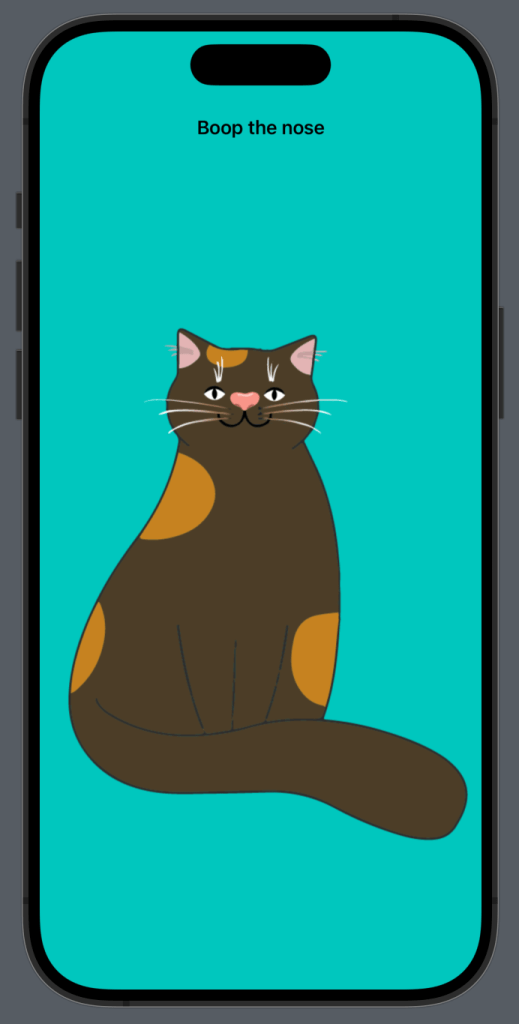
Who doesn’t love booping a cat nose! (Seriously you are deranged if you don’t ;))
So my idea for this app was pretty simple & easy to come up with as a cat owner. A cat whose nose you can boop & something magical happens!
So you guessed it from the above image. The cat is a design file. One I made myself in illustrator. However if you clone the GitHub repo for this project then you’ll see there are a few additional images for when the nose is booped! (Spoilers!)
So whilst we (hopefully) have a good idea of the logic this kind of app is going to be using. I want to start as I always do, laying out the design > adding logic > refactoring code.
import SwiftUI

struct ContentView: View {


    var body: some View {
        ZStack {
            // Background
            Color.mint
                .ignoresSafeArea()
            // Instruction
            VStack {
                Text("Boop the nose")
                    .font(.headline)
                Spacer()
            }
            .padding()


            Image("cat-body")
                .resizable()
                .aspectRatio(contentMode: .fit)

            Image("nose-1")
                .resizable()
                .aspectRatio(contentMode: .fit)
                .onTapGesture {
                    // TODO: change nose
                }
        }
    }
}
So you guessed it, the first thing we are going to need for the logic part is a @State property to keep track of when the user boops the nose. Again a little tip, for the designing part of the items when the nose will be booped by the user, you can just hard code the true instead of the false here & hard code it back to false after the design is complete.
@State var isNoseBooped = falseSo next we are going to change the nose 1 where the //TODO: is.
 if isNoseBooped == false {
                Image("nose-1")
                    .resizable()
                    .aspectRatio(contentMode: .fit)
                    .onTapGesture {
                        isNoseBooped.toggle()
                    }
            }
Now we add the view for when the nose is booped by the user. For the first part I am only concentrating on the nose changing. It was later on that I added the other elements to the design to make it pop. We will be adding those other elements, don’t think I’ve forgotten.
 // Festive Nose
            if isNoseBooped {
                ZStack {

                    VStack {
                        Spacer()

                        Circle()
                            .foregroundStyle(.red)
                            .blur(radius: 5.0)
                            .opacity(0.6)
                            .frame(width: 50)
                            .padding(.bottom, 160)
                            .padding(.trailing, 25)

                        Spacer()

                        Text("Meowy Christmas")
                            .font(.title)
                            .bold()
                            .foregroundStyle(.red)
                            .padding()
                    }

                    Image("nose-2")
                        .resizable()
                        .aspectRatio(contentMode: .fit)
                        .onTapGesture {
                            isNoseBooped.toggle()
                        }
                }
            }
So by now this code should be working. When you boop the nose, we have a Rudolph nose & a Meowy Christmas message. But we can do better, as always there is room for improvement. My first thing is to add animation to the change. It just adds a smoothness that is so worth it.
So we add the withAnimation{} wrapper around the toggle() in the onTapGesture buttons like so (both buttons so it works both ways, this will add a default smooth transition between the changes):
.onTapGesture {
     withAnimation {
           isNoseBooped.toggle()
                   }
               }
Now let’s add a custom modifier to clean up the code a bit before we add more images:
// MARK: - Custom Modifiers

extension Image {
    func resize() -> some View {
        self
            .resizable()
            .aspectRatio(contentMode: .fit)
    }
}
Now we can add the code for the antlers & eyes to change too.
// Cat Images
            Image(isNoseBooped ? "antlers" : "")
                .resize()

            Image("cat-body")
                .resize()

            Image(isNoseBooped ? "eyes-closed" : "eyes-open")
                .resize()

            if isNoseBooped == false {
                Image("nose-1")
                    .resize()
                    .onTapGesture {
                        withAnimation {
                            isNoseBooped.toggle()
                        }
                    }
If you want to go another step, why not change the message up the top when the nose is booped too:
Text(isNoseBooped ? "Meow ho ho" : "Boop the nose")Fancy a challenge? Why not add a meow sound too!
So if you knew my cat you would know that every time I boop her nose, or touch her in general (I swear she is broken ha ha) then I will get meowned at. So it was only right this cat meowed too.
So to start with you will need a sound file. You can find the original in the GitHub repo for this project or use your own. Just make sure to drag it into your Xcode project (in the file navigator) & check “copy items if needed” & target should be this application). Also note the file name & extension type as you will need this. For this project the file is named “Meow” & is an .mp3 file type. To begin we will add a SystemSoundID extension to our project underneath the Image extension we made earlier.
extension SystemSoundID {
    static func playFileNamed(fileName: String, withExtenstion fileExtension: String) {
        var sound: SystemSoundID = 0
        if let soundURL = Bundle.main.url(forResource: fileName, withExtension: fileExtension) {
            AudioServicesCreateSystemSoundID(soundURL as CFURL, &sound)
            AudioServicesPlaySystemSound(sound)
        }
    }
}
Now we want the sound to play when the nose is booped when the image is plain & not festive. This is where we will add our function call passing in the filename & the extension type like so:
if isNoseBooped == false {
         Image("nose-1")
            .resize()
            .onTapGesture {
                 withAnimation {
                     // Meow sound
                     SystemSoundID.playFileNamed(fileName: "Meow", withExtenstion: "mp3")

                            isNoseBooped.toggle()
                        }
                    }
                }
Now when you boop the nose, a little meow plays too! If only I could figure out how to get my screenshot capture software to record the system audio then I could show you ha!
The complete functional code is at the bottom of this post.
Our Completed Application


See you tomorrow for Day 09
Complete Code
import SwiftUI
import AudioToolbox

struct ContentView: View {

    @State var isNoseBooped = false

    var body: some View {
        ZStack {
            // Background
            Color.mint
                .ignoresSafeArea()

            // Instruction
            VStack {
                Text(isNoseBooped ? "Meow ho ho" : "Boop the nose")
                    .font(.headline)
                Spacer()
            }
            .padding()

            // Cat Images
            Image(isNoseBooped ? "antlers" : "")
                .resize()

            Image("cat-body")
                .resize()

            Image(isNoseBooped ? "eyes-closed" : "eyes-open")
                .resize()

            if isNoseBooped == false {
                Image("nose-1")
                    .resize()
                    .onTapGesture {
                        withAnimation {
                            // Meow sound
                            SystemSoundID.playFileNamed(fileName: "Meow", withExtenstion: "mp3")

                            isNoseBooped.toggle()
                        }
                    }
                }

            // Festive Nose
            if isNoseBooped {
                ZStack {

                    VStack {
                        Spacer()

                        // Nose glow
                        Circle()
                            .foregroundStyle(.red)
                            .blur(radius: 5.0)
                            .opacity(0.6)
                            .frame(width: 50)
                            .padding(.bottom, 160)
                            .padding(.trailing, 25)

                        Spacer()

                        Text("Meowy Christmas")
                            .font(.title)
                            .bold()
                            .foregroundStyle(.red)
                            .padding()
                    }

                    Image("nose-2")
                        .resize()
                        .onTapGesture {
                            withAnimation {
                                isNoseBooped.toggle()
                            }
                        }
                }
            }
        }
    }
}

// MARK: - Custom Modifiers

extension Image {
    func resize() -> some View {
        self
            .resizable()
            .aspectRatio(contentMode: .fit)
    }
}


extension SystemSoundID {
    static func playFileNamed(fileName: String, withExtenstion fileExtension: String) {
        var sound: SystemSoundID = 0
        if let soundURL = Bundle.main.url(forResource: fileName, withExtension: fileExtension) {
            AudioServicesCreateSystemSoundID(soundURL as CFURL, &sound)
            AudioServicesPlaySystemSound(sound)
        }
    }
}
