
Who doesn’t love the food at this time of year. There is so much to choose from as well as many sweet treats. What will you create today?

For the Fourth prompt, we have Festive Food. What will you create?
I’m looking forward to seeing what you come up with today.
The holidays are here, and it’s the perfect time to try out some festive recipes! What if you could build an app to search for recipes by ingredients and dietary preferences? This tutorial will guide you step-by-step to create a Holiday Recipe Finder App using SwiftUI. I have left out the ability to add recipes…I’d like to see you try and add that yourself!
App Overview
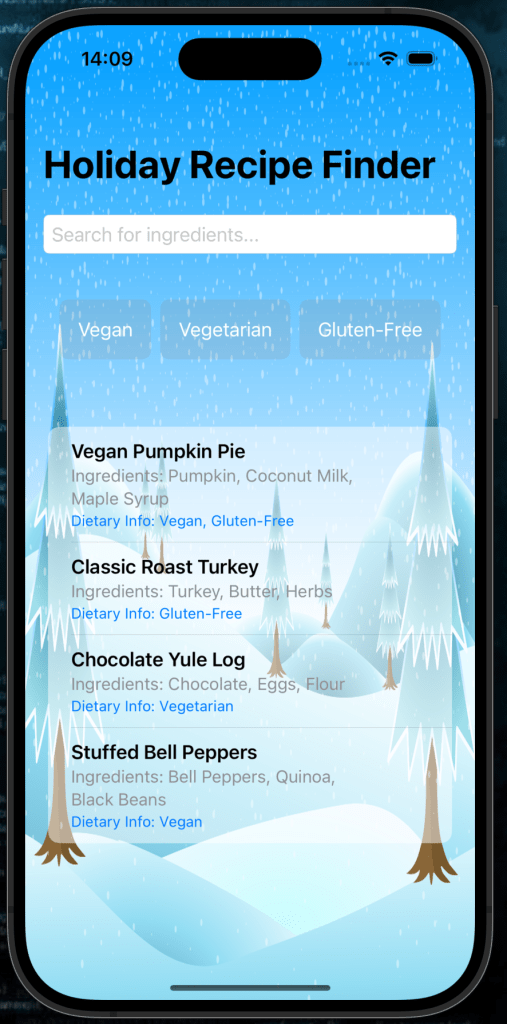
This app will allow users to:
- Search recipes by ingredients.
- Filter recipes based on dietary preferences (e.g., Vegan, Vegetarian, Gluten-Free).
- View recipe details, including the name, ingredients, and dietary info.
Let’s get started!
Getting Started
1. Set Up Your Project
You can find the sample project in the GitHub repository here
Create a new SwiftUI project in Xcode:
- Open Xcode and select Create a new project.
- Choose the App template, click Next.
- Enter your project name (e.g., “HolidayRecipeFinder”), set the interface to SwiftUI, and click Create.
Step 1: Create the Data Model
We’ll first define a model to represent recipes. Add the following Recipe struct to your project:
struct Recipe: Identifiable {
    let id = UUID()
    let name: String
    let ingredients: [String]
    let dietaryInfo: [String]
}
Explanation:
- The
Recipestruct includes:id: A unique identifier.name: The recipe name.ingredients: A list of ingredients.dietaryInfo: A list of dietary attributes (e.g., Vegan, Gluten-Free).
- The
Identifiableprotocol allows SwiftUI to differentiate recipes in a list.
Step 2: Prepare Sample Recipes
To start, we’ll create a few sample recipes. Add this to the @State property in your ContentView:
@State private var recipes: [Recipe] = [
    Recipe(name: "Vegan Pumpkin Pie", ingredients: ["Pumpkin", "Coconut Milk", "Maple Syrup"], dietaryInfo: ["Vegan", "Gluten-Free"]),
    Recipe(name: "Classic Roast Turkey", ingredients: ["Turkey", "Butter", "Herbs"], dietaryInfo: ["Gluten-Free"]),
    Recipe(name: "Chocolate Yule Log", ingredients: ["Chocolate", "Eggs", "Flour"], dietaryInfo: ["Vegetarian"]),
    Recipe(name: "Stuffed Bell Peppers", ingredients: ["Bell Peppers", "Quinoa", "Black Beans"], dietaryInfo: ["Vegan"]),
]
These recipes will populate the app initially. Feel free to add as many as you like.
Step 3: Add Search and Filter Logic
Search Query
We’ll allow users to search for recipes by ingredient. Add this state property:
@State private var searchQuery = ""
Dietary Filters
Users can also filter recipes by dietary preferences. Add this property:
@State private var selectedDietaryFilters: [String] = []
Define the dietary options as a constant:
let dietaryOptions = ["Vegan", "Vegetarian", "Gluten-Free"]
Filtering Recipes
Create a computed property to filter recipes dynamically:
var filteredRecipes: [Recipe] {
    recipes.filter { recipe in
        let matchesQuery = searchQuery.isEmpty || recipe.ingredients.contains { $0.localizedCaseInsensitiveContains(searchQuery) }
        let matchesDietary = selectedDietaryFilters.isEmpty || recipe.dietaryInfo.contains { selectedDietaryFilters.contains($0) }
        return matchesQuery && matchesDietary
    }
}
Explanation:
matchesQuerychecks if the search query is empty or matches any ingredient.matchesDietarychecks if no filters are selected or if the recipe matches the selected filters.
Step 4: Build the UI
Main Layout
Wrap everything in a NavigationView to display a title:
NavigationView {
    VStack {
        // Add components here
    }
    .navigationTitle("Holiday Recipe Finder")
    .background {
        Image("bg")
            .resizable()
            .ignoresSafeArea()
    }
}
The background image adds a festive touch. Replace "bg" with the name of your background asset. Here is the one I used that is contained in the sample project.
Search Bar
Add a TextField for ingredient search:
TextField("Search for ingredients...", text: $searchQuery)
    .textFieldStyle(RoundedBorderTextFieldStyle())
    .padding()
This binds the user’s input to searchQuery.
Dietary Filters
Create filter buttons for dietary options:
HStack {
    ForEach(dietaryOptions, id: \.self) { option in
        Button(action: {
            if selectedDietaryFilters.contains(option) {
                selectedDietaryFilters.removeAll { $0 == option }
            } else {
                selectedDietaryFilters.append(option)
            }
        }) {
            Text(option)
                .padding()
                .background(selectedDietaryFilters.contains(option) ? Color.green : Color.gray.opacity(0.2))
                .foregroundColor(.white)
                .cornerRadius(8)
        }
    }
}
.padding()
Explanation:
- Each button toggles its respective filter in
selectedDietaryFilters. - The button’s background color changes based on whether the filter is active.
Recipe List
Display the filtered recipes in a List:
List(filteredRecipes) { recipe in
    VStack(alignment: .leading) {
        Text(recipe.name)
            .font(.headline)
        Text("Ingredients: " + recipe.ingredients.joined(separator: ", "))
            .font(.subheadline)
            .foregroundColor(.gray)
        Text("Dietary Info: " + recipe.dietaryInfo.joined(separator: ", "))
            .font(.footnote)
            .foregroundColor(.blue)
    }
    .listRowBackground(Color.white.opacity(0.5))
}
.scrollContentBackground(.hidden)
.scrollIndicators(.hidden)
Step 5: Run Your App
Run the app on an iOS Simulator or device. Test the following features:
- Search recipes by ingredient.
- Apply and remove dietary filters.
- View the dynamic list of recipes.
Complete Code
Here’s the complete code for your Holiday Recipe Finder:
import SwiftUI

struct Recipe: Identifiable {
    let id = UUID()
    let name: String
    let ingredients: [String]
    let dietaryInfo: [String]
}

struct ContentView: View {
    @State private var recipes: [Recipe] = [
        Recipe(name: "Vegan Pumpkin Pie", ingredients: ["Pumpkin", "Coconut Milk", "Maple Syrup"], dietaryInfo: ["Vegan", "Gluten-Free"]),
        Recipe(name: "Classic Roast Turkey", ingredients: ["Turkey", "Butter", "Herbs"], dietaryInfo: ["Gluten-Free"]),
        Recipe(name: "Chocolate Yule Log", ingredients: ["Chocolate", "Eggs", "Flour"], dietaryInfo: ["Vegetarian"]),
        Recipe(name: "Stuffed Bell Peppers", ingredients: ["Bell Peppers", "Quinoa", "Black Beans"], dietaryInfo: ["Vegan"]),
    ]

    @State private var searchQuery = ""
    @State private var selectedDietaryFilters: [String] = []

    let dietaryOptions = ["Vegan", "Vegetarian", "Gluten-Free"]

    var filteredRecipes: [Recipe] {
        recipes.filter { recipe in
            let matchesQuery = searchQuery.isEmpty || recipe.ingredients.contains { $0.localizedCaseInsensitiveContains(searchQuery) }
            let matchesDietary = selectedDietaryFilters.isEmpty || recipe.dietaryInfo.contains { selectedDietaryFilters.contains($0) }
            return matchesQuery && matchesDietary
        }
    }

    var body: some View {
        NavigationView {
            VStack {
                // Search Bar
                TextField("Search for ingredients...", text: $searchQuery)
                    .textFieldStyle(RoundedBorderTextFieldStyle())
                    .padding()

                // Dietary Filters
                HStack {
                    ForEach(dietaryOptions, id: \.self) { option in
                        Button(action: {
                            if selectedDietaryFilters.contains(option) {
                                selectedDietaryFilters.removeAll { $0 == option }
                            } else {
                                selectedDietaryFilters.append(option)
                            }
                        }) {
                            Text(option)
                                .padding()
                                .background(selectedDietaryFilters.contains(option) ? Color.green : Color.gray.opacity(0.2))
                                .foregroundColor(.white)
                                .cornerRadius(8)
                        }
                    }
                }
                .padding()

                // Recipe List
                List(filteredRecipes) { recipe in
                    VStack(alignment: .leading) {
                        Text(recipe.name)
                            .font(.headline)
                        Text("Ingredients: " + recipe.ingredients.joined(separator: ", "))
                            .font(.subheadline)
                            .foregroundColor(.gray)
                        Text("Dietary Info: " + recipe.dietaryInfo.joined(separator: ", "))
                            .font(.footnote)
                            .foregroundColor(.blue)
                    }
                    .listRowBackground(Color.white.opacity(0.5))
                }
                .scrollContentBackground(.hidden)
                .scrollIndicators(.hidden)
            }
            .navigationTitle("Holiday Recipe Finder")
            .background {
                Image("bg")
                    .resizable()
                    .ignoresSafeArea()
            }
        }
    }
}
What’s Next?
You can expand this app with features like:
- Adding Recipes: Allow the user to add to the list.
- Recipe Cards: When the user selects the recipe, it opens the recipe card with full instructions.
- Sharing: Allow users to share their recipe via email or text.
🎉 Congratulations! You’ve built a functional Holiday Recipe Finder in SwiftUI. Now you’re ready to search for recipes and make delicious festive dishes! Happy coding!

