
WWDC 2025 began this week and is coming to a close today. As usual there was a lot of new ideas and chatter. Some things we kind of already knew about…but let’s recap.
1. Liquid Glass: Apple’s Unified Design Makeover
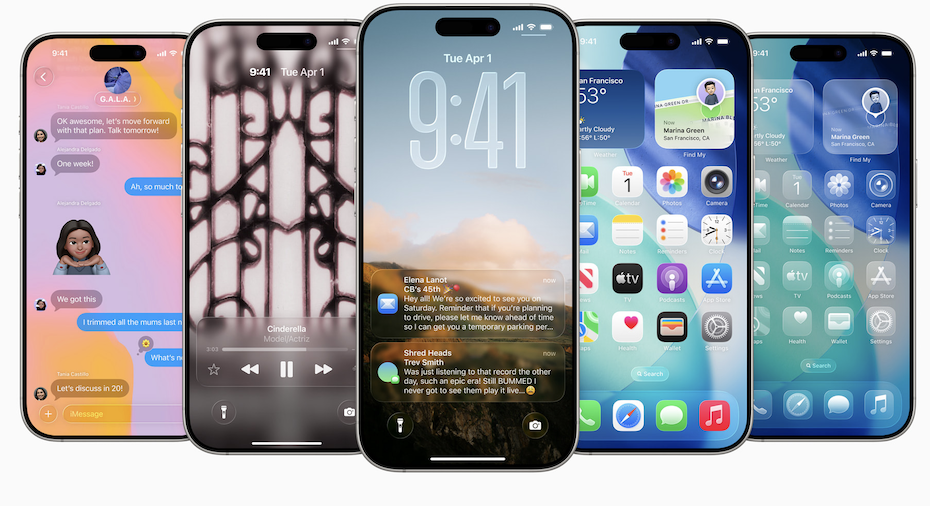
At WWDC on June 9, Apple unveiled Liquid Glass, a fresh, glassy, and translucent design language that will span iOS 26, iPadOS 26, macOS Tahoe, watchOS 26, tvOS 26, and visionOS 26. Inspired by visionOS’s layered UI, it emphasizes refraction, depth, and motion. While many praise its aesthetic unity, others voice concerns about potential readability issues, especially in bright light or low-contrast scenarios. Sadly something I have had the unfortunate experience of downloading the developer beta. Regardless, public betas are coming in July, with full releases expected this autumn.
2. Year-Based OS Naming
In an effort to streamline its ecosystem, Apple realigned its OS versions to the calendar year with iOS 26, iPadOS 26, watchOS 26, visionOS 26 and tvOS 26 while macOS earned a memorable new title: macOS Tahoe.
3. Apple Intelligence & On‑Device AI
Building on last year’s groundwork, Apple introduced new Apple Intelligence features:
Live Translation, supporting messaging, FaceTime captions, and phone calls—all processed entirely on-device. Integration of Visual Intelligence: screenshot actions, calendar event recognition, and intelligent suggestions. Developers can gain access to on-device foundation models through the new Foundation Models framework, enabling private AI-powered apps. Other highlights include ChatGPT integration in Xcode and expanded generative features in Image Playground and Genmoji.
Despite this progress, Apple acknowledged Siri’s full AI overhaul remains pending, with a delay likely into 2026. Whilst disappointing I’m sure we’d all like a fully working Siri than a broken one.
4. iOS 26: Smarter, Friendlier, More Polished
Phone App: Redesigned with call logs, voicemail summaries, spam detection, and “Hold Assist” to auto-alert users when support staff answers. Messages: Group typing indicators, custom chat backgrounds, Apple Cash transfers, and translation at type-time. Visual Intelligence: Recognizes text and items in screenshots for actionable prompts like shopping or calendar entries. Maps Enhancements: Personalized routing suggestions, visited-places tracking, and revamped boarding pass features . Digital IDs: Expansion in Apple Wallet with support at TSA checkpoints now in nine U.S. states.
5. iPadOS 26: Mac‑like Productivity Boost
iPadOS 26 embraces a sophisticated, windowed UI with resizable apps, a new Phone app, and a Mac-style menu bar. Apple asserts this transformation elevates the iPad to a full productivity experience. I have to say I am personally very excited for this one as a user.
6. macOS Tahoe & watchOS 26
macOS Tahoe introduces a customizable Control Center, revamped Phone integration, deeper Apple Intelligence in Spotlight, and improved file/folder management.
watchOS 26 brings AI‑powered Workout Buddy, call screening, Live Translation, and the Notes app to Apple Watch.
7. visionOS 26 & Accessories
visionOS 26 brings spatial widgets, enhanced avatars (“Personas”), shared 3D experiences, PSVR2 controller support, and compatibility with Logitech pens. It’s quite interesting seeing how visionOS is growing and becoming an experience most would like to try.
8. Developer Tools, Games & CarPlay
A fresh Game app hub debuts. Metal 4 and new ML shader tools optimize graphics and AI workloads. I’m quite pleased about this as a developer who’s just getting into game making. Apple also unveiled CarPlay Ultra, delivering vehicle system control (seat heaters, climate) in collaboration with many brands including Aston Martin.
9. Reception & Critique
Reaction to WWDC was mixed and I can understand why…even I felt the ups and downs this year.
While many applauded Apple’s privacy‑focused, cohesive design and AI rollout, critics emphasized the incremental nature of the update and absence of a fully revamped Siri. Some users publicly criticized the new Liquid Glass UI for potential readability and usability drawbacks. Sadly I am too one of those people. The developer beta has left me with severe dizziness and vision issues looking at the new liquid glass and indeed 3d icons. There is no way to turn it off yet. I do hope they give users some control. Apple has always taken accessibility so seriously, I am very surprised by this step seemingly backward. Nevertheless, Apple executives highlighted this as a long-term strategy to build a strong foundation across design and AI so we can hope for improvements.
In Summary…
WWDC 2025 may not have dazzled with a single headline feature, but it marked a pivotal shift. Apple has unified its look, embraced on-device AI, and opened its ecosystem for developers to innovate. Its cautious, privacy-respecting strategy sets the tone: subtle yet strategic progression, laying groundwork for major advances in the years ahead. What are your thoughts as users and developers?

