

Welcome to Day 07 of #The12DaysOfSwiftmas
Today’s prompt…
As a self confessed foodie, this prompt was another exciting one. In my head I was going to do a full list of my favourite festive recipes. Turns out that writing out your own recipes takes a lot of time!
Swiftmas 2023 GitHub repo: https://github.com/thecodingsprite/Swiftmas-2023/tree/main
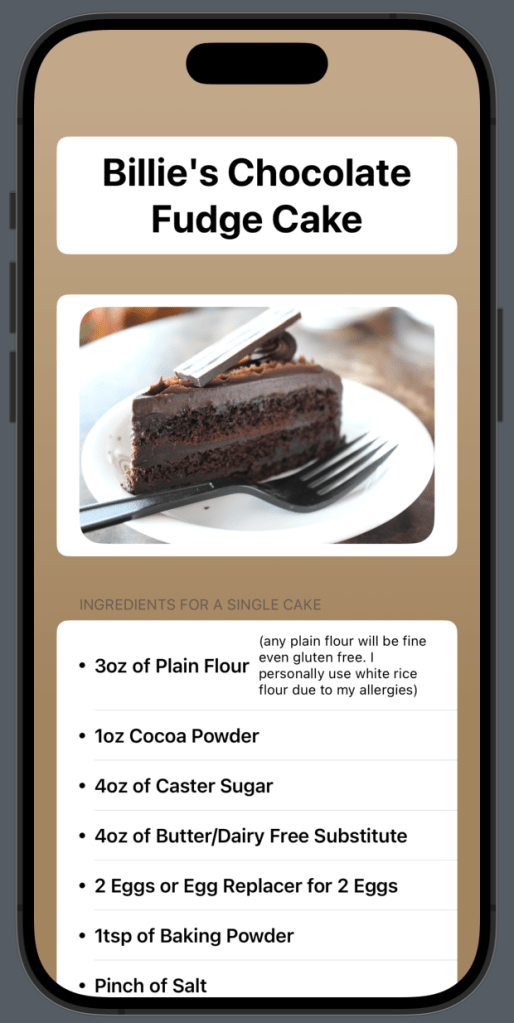
So instead I picked my Christmas Winner out of all my recipes. This cake is a beauty! My entire family love this recipe & what’s better is that it works for those with allergies too. Sure this is a simple looking application but it does involve some new SwiftUI elements for anyone not too familiar with it so I think it’s a good demonstration, especially when we start cleaning up the base code.
Okay so let’s begin. The layout of this app is really the hard part (apart from recalling a recipe you’ve been using for years, yet can’t remember it when you need it). Originally I started out with a ScrollView but quickly realised for the format & layout of this recipe another Form would be better. Easier to section off & overall easier & quicker to layout the design in the way my mind could see it. This is my very basic (horrendous code designed) layout. But something I can build upon & refine as I go. I always think of a new app like a painting. You start with a super rough sketch that looks a mess to most, but to the artist, we see where it is going to end up, & eventually after many layers of work, something beautiful appears. I use the same method of thinking when starting an application. Rough it out, refine it as best as I can & as far as I can (given a time frame).
 Form {
                Section {
                    // Title
                    Text("Billie's Chocolate Fudge Cake")
                        .font(.largeTitle)
                        .bold()
                        .frame(maxWidth: .infinity, alignment: .center)
                        .multilineTextAlignment(.center)
                }
                //Image
                Image("cake")
                    .resizable()
                    .aspectRatio(contentMode: .fit)
                    .clipShape(RoundedRectangle(cornerRadius: 20))

                // Ingredients
                Section {
                    HStack {
                        Image(systemName: "circle.fill")
                            .resizable()
                            .aspectRatio(contentMode: .fit)
                            .frame(width: 5)

                        HStack {
                            Text("3oz of Plain Flour")
                                .bold()
                            Text("(any plain flour will be fine even gluten free. I personally use white rice flour due to my allergies)")
                                .font(Font.system(size: 12))
                        }
                    }
                    HStack {
                        Image(systemName: "circle.fill")
                            .resizable()
                            .aspectRatio(contentMode: .fit)
                            .frame(width: 5)

                        Text("1oz Cocoa Powder")
                            .bold()
                    }


                    HStack {
                        Image(systemName: "circle.fill")
                            .resizable()
                            .aspectRatio(contentMode: .fit)
                            .frame(width: 5)

                        Text("4oz of Caster Sugar")
                            .bold()
                    }

                    HStack {
                        Image(systemName: "circle.fill")
                            .resizable()
                            .aspectRatio(contentMode: .fit)
                            .frame(width: 5)

                        Text("4oz of Butter/Dairy Free Substitute")
                            .bold()
                    }

                    HStack {
                        Image(systemName: "circle.fill")
                            .resizable()
                            .aspectRatio(contentMode: .fit)
                            .frame(width: 5)

                        Text("2 Eggs or Egg Replacer for 2 Eggs")
                            .bold()
                    }

                    HStack {
                        Image(systemName: "circle.fill")
                            .resizable()
                            .aspectRatio(contentMode: .fit)
                            .frame(width: 5)

                        Text("1tsp of Baking Powder")
                            .bold()
                    }

                    HStack {
                        Image(systemName: "circle.fill")
                            .resizable()
                            .aspectRatio(contentMode: .fit)
                            .frame(width: 5)

                        Text("Pinch of Salt")
                            .bold()
                    }

                    HStack {
                        HStack {
                            Text("2tsp Vanilla Essence")
                                .bold()
                            Text("Optional")
                                .font(Font.system(size: 12))
                        }

                    }
                } header: {
                    Text("Ingredients for a Single Cake")
                }

                Section {
                    HStack {
                        Image(systemName: "circle.fill")
                            .resizable()
                            .aspectRatio(contentMode: .fit)
                            .frame(width: 5)

                        Text("Icing/Confectioners Sugar")
                            .bold()
                    }
                    HStack {
                        Image(systemName: "circle.fill")
                            .resizable()
                            .aspectRatio(contentMode: .fit)
                            .frame(width: 5)

                        Text("Cocoa Powder")
                            .bold()
                    }
                    HStack {
                        Image(systemName: "circle.fill")
                            .resizable()
                            .aspectRatio(contentMode: .fit)
                            .frame(width: 5)

                        Text("A Little Water")
                            .bold()
                    }

                } header: {
                    Text("Ingredients for Icing")
                }


                //Recipe instructions
                Section {
                    Text("Begin by preheating your oven to 180°C / 356°F. At this point it is a good idea to prep your baking tin. I personally use a standard round cake tin with greaseproof paper stuck to the insides using my dairy free butter as the glue. This has always made a great non stick cake tin even more non stick for me personally.")
                    Text("To start the cake, we begin by creaming together the butter and sugar in a bowl until fluffy.")
                    Text("In a seperate bowl, weigh out & seive the flour, cocoa powder, baking powder & salt. Put this to the side for a moment.")
                    Text("If using vanilla essence I prefer to crack my eggs into another seperate bowl, lightly whisk them & then whisk in the vanilla essence to the eggs.")
                    Text("Add the eggs bit by bit into the butter & sugar, whisking the whole time. If you have a electric mixer, I do recommend using one as the high speed whisk can stop any curdling process.")
                    Text("After your eggs have been whisked into the mixture you will want to slow things down and add your dry ingredients bowl you set to one side earlier. If hand mixing, then fold your flour into the mix, if using an electric mixer, reduce the speed to minimum.")
                    Text("Once your mixture is completely mixed, pour your mixture into the prepared cake tin from step 1. Smooth over the top & try to level the cake to ensure it is even on all sides.")
                    Text("Bake for around 30-40 miniutes or until cooked. I recommend testing the cake by inserting a knife into the center, if the knife comes back out clean then your cake is cooked, if there is still mixture on the knife, bake for another 5 minutes & test again (repeat the testing & baking until cooked, times can vary based on different ovens).")
                    Text("Once cooked, remove from the tin & leave to cool. Once cool we can add the icing")
                } header: {
                    Text("Cake Instructions")
                }

                //Icing instructions
                Section {
                    Text("I have never actually measured out my ingredients for the icing. Sometimes I bake two cakes so need more, sometimes just one. I also adapt the amount of cocoa powder depending on who I am baking for. You will need a bowl, spoon to mix, icing sugar, cocoa powder & a little water.")
                    Text("In a bowl, add a good amount of icing sugar. I go for about half a pack when doing two cakes, this tends to do the sandwich middle & the top whilst leaving plenty if i add too much water & need to re-thicken the mixture. Roughly add a good 3-4 tablespoons of cocoa powder to the icing sugar. You can add or indeed start at only 1 or two if you don't want it very chocolatey.")
                    Text("Slowly add a little water & mix. For the consitency, we are going NOT runny! We want a thick fudge like consitency so adding water slowly is the key. Once you are close to the consistency, I tend to taste the mixture to see whether or not to add more cocoa powder. I would say for a super rich fudge taste probably around 6 tbsp worth in total is what I would use.")
                    Text("Once you are happy with your consitency (going for thick yet smoothable) then grab your cake & begin icing & decorating however you so wish!")
                    Text("Fridge for an hour or two to let the icing set, or if like me...tuck in and enjoy!")
                } header: {
                    Text("To Fudge It")
                }
            }
            .background(Color.brown
                        .gradient)
            .scrollContentBackground(.hidden)
        }
    }
}
Let’s make the code cleaner, yet the programming harder.
Now if you have been following along with us each day (first off, thank you so much!) then you will be familiar now with custom modifiers. I may even go as far as to say I hope you can already see from the above layout of code, where we reuse modifiers that could easily be more dynamic by us creating a custom modifier. Let’s start there… oh also I would like to note, you can call your extension function whatever you like if it makes things easier for you to understand. You could say func resizeMyImages() for example.
extension Image {

    func resize() -> some View {
        self
            .resizable()
            .aspectRatio(contentMode: .fit)
            .frame(width: 5)
    }
}
This extension is placed outside/after the entire contentView struct. I just want to re-establish that for anyone new to the challenge & a bit lost where we put extensions & custom modifiers. This is going to replace the 3 re-used modifiers in the HStacks where we list the ingredients, on the systemImage.
// Replace the modifiers on each Stack containing the systemImage

// Before
HStack {
   Image(systemName: "circle.fill")
       .resizable()
       .aspectRatio(contentMode: .fit)
       .frame(width: 5)

    Text("Cocoa Powder")
       .bold()
}

// After

HStack {
   Image(systemName: "circle.fill")
       .resize()

    Text("Cocoa Powder")
       .bold()
}
Next to tidy up is that unsightly amount of strings for the recipe instructions. Bad layout that is easy to make mistakes with. So let’s fix that by moving the strings to a separate file within the project. Right-click on the file navigator > New File> Swift File – Your a name this what you want, I went with CakeRecipe. Then we can create another couple of static declared variables contain arrays of strings like so. ( if you remember declaring a variable static means you can access it through the entire project. Not something you always want for security but for these kind of apps, it’s perfect.)
import Foundation

struct CakeRecipe {

    static var ingredients = [

        "1oz Cocoa Powder",
        "4oz of Caster Sugar",
        "4oz of Butter/Dairy Free Substitute",
        "2 Eggs or Egg Replacer for 2 Eggs",
        "1tsp of Baking Powder",
        "Pinch of Salt"
    ]

    static var icingIngredients = [
        "Icing/Confectioners Sugar",
        "Cocoa Powder",
        "A Little Water"

    ]

    static var cakeRecipe = [
        "Begin by preheating your oven to 180°C / 356°F. At this point it is a good idea to prep your baking tin. I personally use a standard round cake tin with greaseproof paper stuck to the insides using my dairy free butter as the glue. This has always made a great non stick cake tin even more non stick for me personally.",

        "To start the cake, we begin by creaming together the butter and sugar in a bowl until fluffy.",

        "In a seperate bowl, weigh out & seive the flour, cocoa powder, baking powder & salt. Put this to the side for a moment.",

        "If using vanilla essence I prefer to crack my eggs into another seperate bowl, lightly whisk them & then whisk in the vanilla essence to the eggs.",

        "Add the eggs bit by bit into the butter & sugar, whisking the whole time. If you have a electric mixer, I do recommend using one as the high speed whisk can stop any curdling process.",

        "After your eggs have been whisked into the mixture you will want to slow things down and add your dry ingredients bowl you set to one side earlier. If hand mixing, then fold your flour into the mix, if using an electric mixer, reduce the speed to minimum.",

        "Once your mixture is completely mixed, pour your mixture into the prepared cake tin from step 1. Smooth over the top & try to level the cake to ensure it is even on all sides.",

        "Bake for around 30-40 miniutes or until cooked. I recommend testing the cake by inserting a knife into the center, if the knife comes back out clean then your cake is cooked, if there is still mixture on the knife, bake for another 5 minutes & test again (repeat the testing & baking until cooked, times can vary based on different ovens).",

        "Once cooked, remove from the tin & leave to cool. Once cool we can add the icing"

    ]

    static var icingRecipe = [
       "I have never actually measured out my ingredients for the icing. Sometimes I bake two cakes so need ore, sometimes just one. I also adapt the amount of cocoa powder depending on who I am baking for. You ill need a bowl, spoon to mix, icing sugar, cocoa powder & a little water.",
       "In a bowl, add a good amount of icing sugar. I go for about half a pack when doing two cakes, this tends o do the sandwich middle & the top whilst leaving plenty if i add too much water & need to re-thicken the ixture. Roughly add a good 3-4 tablespoons of cocoa powder to the icing sugar. You can add or indeed tart at only 1 or two if you don't want it very chocolatey.",
       "Slowly add a little water & mix. For the consitency, we are going NOT runny! We want a thick fudge like onsitency so adding water slowly is the key. Once you are close to the consistency, I tend to taste the ixture to see whether or not to add more cocoa powder. I would say for a super rich fudge taste probably round 6 tbsp worth in total is what I would use.",
       "Once you are happy with your consitency (going for thick yet smoothable) then grab your cake & begin cing & decorating however you so wish!",
       "Fridge for an hour or two to let the icing set, or if like me...tuck in and enjoy!"
    ]
}
Now we need to go back to content view & fix our missing elements. For this we can now use a ForEach loop. First time using them in the challenge so if you are not familiar with ForEach then it basically means it will loop through for every item given the parameters we put in. You can set a range of numbers or in our case an array for it to loop through. The only ingredients I left out of the for loop were the ones with a double HStack as it was just easier to leave those alone. Here is the ForEach loop & then the entire ingredients sections of code so you can see how it implements within the structure.
// All other ingredients
ForEach (CakeRecipe.ingredients, id: \.self) { ingredient in
                        HStack {
                            Image(systemName: "circle.fill")
                                .resize()
                            Text(ingredient)
                                .bold()
                        }

 // Icing ingredients
 Section {
     ForEach (CakeRecipe.icingIngredients, id: \.self) { icing in
                        HStack {
                            Image(systemName: "circle.fill")
                                .resize()

                            Text(icing)
                                .bold()
                        }
                    }
                } header: {
                    Text("Ingredients for Icing")
                }
// Ingredients
Section {
// Flour instruction
HStack {
Image(systemName: "circle.fill")
.resize()
HStack {
Text("3oz of Plain Flour")
.bold()
Text("(any plain flour will be fine even gluten free. I personally use white rice flour due to my allergies)")
.font(Font.system(size: 12))
}
}
// All other ingredients
ForEach (CakeRecipe.ingredients, id: \.self) { ingredient in
HStack {
Image(systemName: "circle.fill")
.resize()
Text(ingredient)
.bold()
}
}
// Optional ingredient
HStack {
Image(systemName: "circle.fill")
.resize()
HStack {
Text("2tsp Vanilla Essence")
.bold()
Text("Optional")
.font(Font.system(size: 12))
}
}
} header: {
Text("Ingredients for a Single Cake")
}
// Icing ingredients
Section {
ForEach (CakeRecipe.icingIngredients, id: \.self) { icing in
HStack {
Image(systemName: "circle.fill")
.resize()
Text(icing)
.bold()
}
}
} header: {
Text("Ingredients for Icing")
}Now to fix the recipe instructions. Again we are going to use a ForEach…can you do it before I show you the code?
//Recipe instructions
Section {
ForEach(CakeRecipe.cakeRecipe, id: \.self) { instructions in
Text(instructions)
}
} header: {
Text("Cake Instructions")
}
//Icing instructions
Section {
ForEach(CakeRecipe.icingRecipe, id: \.self) { recipe in
Text(recipe)
}
} header: {
Text("To Fudge It")
}
}Lastly I added the image of the cake.
The complete functional code is at the bottom of this post.
Our Completed Application
See you tomorrow for Day 08
Complete Code
import SwiftUI
struct ContentView: View {
var body: some View {
ZStack {
Form {
Section {
// Title
Text("Billie's Chocolate Fudge Cake")
.font(.largeTitle)
.bold()
.frame(maxWidth: .infinity, alignment: .center)
.multilineTextAlignment(.center)
}
//Image
Image("cake")
.resizable()
.aspectRatio(contentMode: .fit)
.clipShape(RoundedRectangle(cornerRadius: 20))
// Ingredients
Section {
   // Flour instruction
   HStack {
       Image(systemName: "circle.fill")
            .resize()

   HStack {
        Text("3oz of Plain Flour")
            .bold()
        Text("(any plain flour will be fine even gluten free. I personally use white rice flour due to my allergies)")
            .font(Font.system(size: 12))
            }
        }
 // All other ingredients
ForEach (CakeRecipe.ingredients, id: \.self) { ingredient in
    HStack {
         Image(systemName: "circle.fill")
             .resize()
         Text(ingredient)
             .bold()
             }
          }

// Optional ingredient
HStack {
   Image(systemName: "circle.fill")
       .resize()

   HStack {
       Text("2tsp Vanilla Essence")
            .bold()
       Text("Optional")
            .font(Font.system(size: 12))
            }
       }
} header: {
       Text("Ingredients for a Single Cake")
                }

// Icing ingredients
                Section {
                    ForEach (CakeRecipe.icingIngredients, id: \.self) { icing in
                        HStack {
                            Image(systemName: "circle.fill")
                                .resize()

                            Text(icing)
                                .bold()
                        }
                    }
                } header: {
                    Text("Ingredients for Icing")
                }
//Recipe instructions
                Section {
                    ForEach(CakeRecipe.cakeRecipe, id: \.self) { instructions in
                        Text(instructions)
                    }
                } header: {
                    Text("Cake Instructions")
                }

                //Icing instructions
                Section {
                    ForEach(CakeRecipe.icingRecipe, id: \.self) { recipe in
                        Text(recipe)
                    }
                } header: {
                    Text("To Fudge It")
                }
            }
.background(Color.brown
.gradient)
.scrollContentBackground(.hidden)
}
}
}
// MARK: - Custom Modifiers
extension Image {
func resize() -> some View {
self
.resizable()
.aspectRatio(contentMode: .fit)
.frame(width: 5)
}
}
Leave a comment